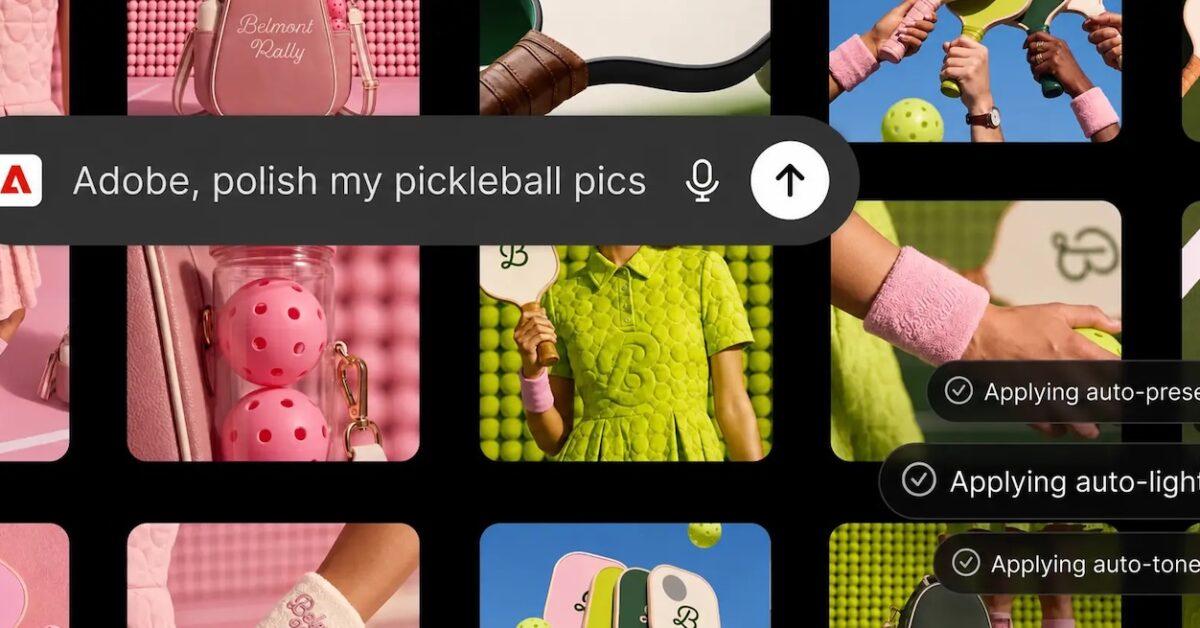
For a few months now, I have been observing a fascinating trend in the AI ecosystem: major tech companies are looking to integrate their most powerful tools directly into ChatGPT. Adobe has just taken a significant step in this direction. On August 6, 2026, the publisher announced the launch of a unique plugin that brings together over 70 features from its most popular applications: Photoshop, Firefly, Premiere, Acrobat, Illustrator, InDesign, Lightroom, and Adobe Express. This is not just an additional integration. It is a true revolution for creatives and design professionals looking to boost their productivity. Until now, each Adobe tool was used independently on ChatGPT. Now, they are all accessible from a single interface, which completely changes the game. I believe this approach marks an important turning point: creative tools are no longer isolated applications, but intelligent extensions of our AI assistants. In this article, I invite you to discover how this plugin works, what its real capabilities are, and how it can transform your way of working.
📋 Summary
A revolutionary plugin for creatives
What I find particularly interesting about this Adobe plugin is that it represents a strategic convergence between two industry giants. Adobe and OpenAI have decided to create a unified experience where users no longer need to switch between multiple applications. The plugin is compatible not only with ChatGPT but also with Codex and ChatGPT Work, significantly broadening its scope. This cross-platform approach shows that Adobe is not solely relying on OpenAI but is looking to be present wherever users work with AI 🎯.
Access to the plugin is free for all ChatGPT users, which is a crucial point. You can use it on the web version as well as on the mobile app. There is even a Guest mode that provides access to a wide range of features without creating an account. However, if you connect your Adobe account, you unlock the full generative capabilities, access to your Creative Cloud files, and the ability to save your projects between sessions. It’s a smart strategy: Adobe offers a free basic experience but encourages users to log in for premium features.
What truly fascinates me is the flexibility of the system. The plugin automatically mobilizes the right Adobe tools in the background based on your request. You don’t need to know exactly which tool to use. You simply describe what you want to do, and the plugin takes care of using the right application. It’s an intelligent abstraction that makes the experience much more intuitive for users who may not be familiar with all Adobe tools in detail.
The 70 game-changing features
Now let’s talk about the concrete capabilities. These 70 features cover an impressive spectrum of creative tasks and productivity. You can design visual assets, generate PDFs, retouch photos, create illustrations, edit videos, and much more. I must admit that the scope is truly impressive. Photoshop brings its photo retouching and image manipulation capabilities. Firefly, Adobe’s AI image generation engine, allows you to create visuals from text descriptions 🎨.
What makes these 70 features particularly powerful is that they are not simply juxtaposed. They work together coherently. For example, you can generate an image with Firefly, retouch it with Photoshop, integrate it into a video with Premiere, and create a PDF document with Acrobat, all within a single ChatGPT conversation. It’s a deep integration that creates a true creative workflow.
I think it’s important to note that these features also include lesser-known but equally useful tools. Lightroom for photo management and editing, Illustrator for vector graphics, InDesign for layout, and Adobe Express for quick creations. This diversity of tools means that the plugin can meet almost any creative need, whether for a professional designer or an entrepreneur creating content for their social media.
How to integrate Adobe into your ChatGPT workflow
Activating the plugin is remarkably simple, and that’s a positive point. Here are the steps: first, open ChatGPT. Next, go to the Plugins tab and download the Adobe plugin. Start a new conversation and type “@Adobe” in the prompt bar. Select Adobe from the menu that appears, or use the + button to choose it from your installed plugins. It’s really intuitive, and even less tech-savvy users should be able to do it without any problem 🔧.
Once the plugin is activated, you can start giving instructions in natural language. For example, you might say: “Create an image of a mountain landscape at sunset, then retouch it to increase the color saturation.” The plugin will understand your request and use Firefly to generate the image, then Photoshop to retouch it. It’s this contextual understanding that makes the plugin so powerful. You don’t need to know the technical details of each tool.
I must emphasize that the plugin has been available globally since August 6, 2026. There are no geographical restrictions or access limitations. This means that creatives around the world can immediately start using it. Additionally, Adobe has indicated that the plugin will continue to evolve with new features added regularly. This iterative approach ensures that the tool will remain relevant and useful as user needs evolve.
The benefits for design professionals
For professional designers, this plugin represents a real boon. Imagine being able to access all your favorite Adobe tools without leaving ChatGPT. This significantly reduces the time spent switching between applications. I believe this is a considerable productivity gain, especially for those working on complex projects involving multiple steps. Instead of spending 30 minutes opening Photoshop, creating an image, exporting it, and then importing it into Premiere, you can do all of that in a few minutes in ChatGPT 💼.
Another major advantage is the integration with Creative Cloud. If you connect your Adobe account, you can directly access your files stored in the cloud. This means you can pick up a project you started in Photoshop, continue it in ChatGPT, and then finish it in Premiere, all while maintaining perfect continuity. It’s a truly seamless working experience that wasn’t possible before. You can also browse Adobe Stock resources directly from ChatGPT, which significantly enriches your creative possibilities.
I must also mention the collaborative aspect. With ChatGPT, you can share your conversations with others. This means you can collaborate with colleagues on creative projects directly within ChatGPT. You can showcase your creative process, get real-time feedback, and iterate quickly. This seamless collaboration is something traditional tools did not allow as easily. It’s particularly useful for distributed teams working remotely.
The future of the collaboration between Adobe and OpenAI
This plugin is just the beginning of a broader collaboration between Adobe and OpenAI. Adobe has already indicated that integrations with Slack and Gemini are expected in the coming weeks. This shows that the publisher is adopting an ambitious cross-platform strategy. I believe we will see more and more Adobe tools integrated into various AI platforms in the coming months. This trend reflects a broader reality: creative tools are becoming increasingly distributed and accessible via AI interfaces 🚀.
What particularly interests me is how this collaboration could evolve. Could we imagine ChatGPT becoming a true complete creative suite, rivaling traditional desktop applications? That’s a fascinating question. Adobe and OpenAI could continue to add features, improve integration, and create a truly seamless experience. The convergence of creative tools around AI could completely redefine how designers work. We could see a new generation of creatives emerging who primarily work in the browser rather than on desktop applications.
I must also note that this approach benefits OpenAI. By integrating Adobe tools, ChatGPT becomes more powerful and useful for creatives. This strengthens OpenAI’s position as a central platform for creative and productive work. It’s a perfect example of how strategic partnerships can create value for all parties involved. Adobe gains better distribution of its tools, OpenAI gains a more powerful platform, and users gain a better experience. To learn more about how AI is transforming creative tools, check out our dedicated resources.
Conclusion
The Adobe plugin for ChatGPT represents a significant step in the evolution of creative tools. By bringing together 70 features in a single interface, Adobe and OpenAI are creating a truly revolutionary working experience. I am convinced that this will change the way designers and creatives work on a daily basis. The benefits are clear: productivity gains, easy access to tools, seamless integration with Creative Cloud, and simplified collaboration. It’s a major transformation of the creative landscape. If you work in design or content creation, automating creative workflows is now within your reach.
Looking to the future, I believe we will see more and more professional tools integrated into AI platforms. The Adobe plugin is just the beginning of a broader trend. Creatives who quickly adopt these new tools will have a significant competitive advantage. If you work in design, video, or content creation, I highly recommend trying this plugin. It’s free, easy to use, and could really transform your productivity. To explore further how AI is revolutionizing your profession, check out our comprehensive guides. The future of creative work is here, and it’s more accessible than ever.
📝 In Brief
- Adobe launches a unique plugin for ChatGPT bringing together over 70 creative and productivity tools
- The plugin is free and accessible to all ChatGPT users, with premium features for connected Adobe accounts
- Creatives can access Photoshop, Firefly, Premiere, Acrobat, Illustrator, InDesign, Lightroom, and Adobe Express directly in ChatGPT
- This integration significantly improves productivity by eliminating the need to switch between multiple applications